The iOS 16 update focuses primarily on the Lock Screen and new features for apps like Mail, Messages, and Photos, but Apple did make some small changes to the Notes and Reminders app, adding a handful of new options.
iOS 16 更新主要集中在锁屏和邮件、信息以及 照片 等应用的新功能上,但苹果确实对笔记和提醒应用进行了小幅调整,增加了一些新选项。
This guide highlights all of the new features in the Notes and Reminders apps for iOS 16, which is available now.
本指南重点介绍了 iOS 16 中备忘录和提醒事项应用的所有新功能,该版本现已推出。
笔记
There are some quality of life improvements for the Notes app, most notably an option to lock notes with the same passcode used to lock your iPhone.
在备忘录应用中有一些生活质量的改进,最显著的是可以用与锁定您的 iPhone 相同的密码来锁定备忘录的选项。
iPhone 快速笔记
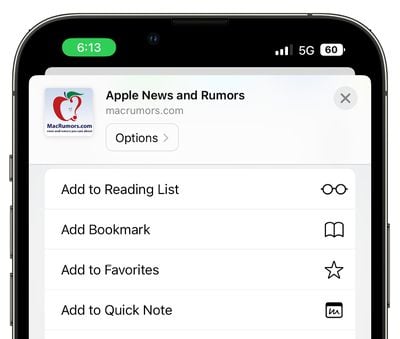
The Share Sheet has gained an "Add to Quick Note" option so you can create Quick Notes on iPhone. Add to Quick Note is an option across the iOS operating system, in first and third-party apps. You can create Quick Notes with Safari links, images, and more.
共享表单增加了“添加到快速笔记”选项,因此您可以在 iPhone 上创建快速笔记。“添加到快速笔记”是 iOS 操作系统中,第一方和第三方应用程序的一个选项。您可以使用 Safari 链接、图片等创建快速笔记。
Quick Notes used to be an iPad-only feature introduced in iPadOS 15, but iOS 16 brings them to the iPhone as well. On iPad, you can create Quick Notes from the Lock Screen, but on iPhone, the Share Sheet interface is required.
快速备注曾经是仅限于iPad的功能,最早在iPadOS 15中引入,但iOS 16也将其带到了 iPhone。在iPad上,您可以从锁屏创建快速备注,但在 iPhone 上,需要使用分享表单界面。
更新的智能文件夹
There are new Smart Folder filters available for better note organization. Rules can be created for Date Created, Date Modified, Shared, Mentions, Checklists, Attachments, Folder, Quick Notes, Pinned Notes, and Locked Notes.